

Search as we know it has evolved significantly over the last 18 months and our approach to reporting has to adapt with it.
There’s continued industry anxiety around AI Overviews eating up organic CTR, and more so that the way in which people search has changed. People don’t just look to Google anymore to search, they use LLMs and social platforms more than ever. And most importantly, even if the search is happening within Google, they often have less reason to click with the rise of AIOs on the SERPS.
That being said, your users are still searching, you just need to know where to look and how to find them. This is exactly why we’re continuing to evolve our search strategies to include GEO optimisations, ensuring your brand remains visible where these new conversations are happening.
And if they’re searching, we need to measure it.
A recent study from Rank Fishkin at SparkToro reports that AIs are highly inconsistent within their results and recommendations, so we need to be careful when tracking AI visibility and reporting back on our worth within these platforms. We should continue to report on clicks, impressions and CTR like we traditionally would, but equally, we need to understand and report on what clicks, and most importantly, what revenue is coming to the site across these search organic platforms.
Measuring AI isn’t done with a single metric, and especially not first party metrics either.
I’m going to break this down into 1st party data, and 3rd party data. The pros and cons and what they bring to the table.
Using Regex to understand AI referral traffic
Arguably, this is the most reliable source of truth you can find. Using a regex filter within GA4, you’re able to segment LLM data to view trends over time, landing page data, and most importantly… understand what LLM data is converting, and why.
By using the below regex, this will help you to understand and dig deeper into the platform and identify trends.
chatgpt\.com|perplexity\.ai|openai\.com|gemini\.google\.com|copilot\.microsoft\.com|claude\.ai
How to apply this?
- Open the required property in Google Analytics.
- Go to Reports > Acquisition > Traffic acquisition.
- Change the primary dimension dropdown to Session source.
- In the search box above the table, change the match type to Matches regex and paste the regex above.
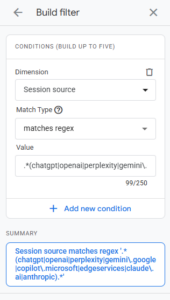
Top Tip : This can also be applied throughout various GA4 reports to show more insightful data. We often use this to understand the landing pages which users are entering the site from LLMs are, and how we can also optimise other pages to improve landing page performance and visibility within AI platforms.
Generative AI Reporting in GSC
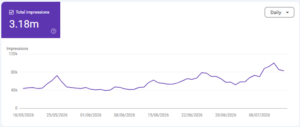
In June 2026, Google Search Console introduced their Generative AI report but this unfortunately doesn’t allow us to join the dots, just yet (similarly to traditional reporting!).
This new report provides an incredibly helpful look at your visibility across AI Overviews and AI Mode. From our early analysis across a range of clients, a few similar trends have emerged:
- In-depth blogs and guides are gaining tons of traction and visibility. Although this is really positive to see, they occasionally suffer from low CTR due to the “zero-click search” era.
- We’re also seeing homepages pull a high number of impressions, usually due to brand recognition and when a user asks an LLM for long-tail, suggestive recommendation, Google cites the primary domain.
- Local stores and physical locations are gaining a lot of traction. You can use this report to dissect the popular regions where your business is being cited, allowing you to double down on your local SEO strategy.
Showing up everywhere is key.
Prompt tracking & understanding user intent
There’s an ever growing list of third-party tools now offering prompt tracking for LLMs and search. While prompt tracking is far from an exact science at this stage, these platforms can serve as really good indicators of emerging themes, user intent, and content gaps.
Some of the top industry tools currently exploring prompt tracking and generative visibility include:
However, it’s important to understand that all of these platforms are still also finding their feet in this landscape (just like the rest of us!).
Because we don’t have direct, first-party data loops being fed back from LLMs, these tools are relying on their own internal machine learning to generate the prompts they predict your audience is using, rather than pulling from a live database.
That being said, using these tools can often be really useful to also understand the sentiment around your brand too, whether your brand or your products is being spoken highly of across the platforms, or any negative sentiments around specific products or services too.
As an industry, we must treat this data as indicative and use our supporting knowledge on these brands to help make those prompt assumptions too.
Tracking long-tail prompts in search query reports
Yes, regex, again (sorry!)
I’ve mentioned this one before, but here I am again.
Understanding long tail searches and common questions across sites can be tough. Especially when you’re working with masses of data and want to understand the problems users are facing and why your solution can help them. By using the following regex, this allows you to segment search query data in Google Search Console to isolate all search terms that start with, end with, or contain classic conversational question words.
^(what|how|why|where|who|which|can|should|is|does)\b
This will isolate queries like “how do I…”, “what is the best way to…”, “when should I…”, which will then heavily mimic the types of phrases people search into ChatGPT or Google’s AI Overviews.
Measuring impact when the search landscape changes
To summarise, reporting on results that are never consistent is going to be a steep learning curve for us all. AI is here to adapt and learn from users, it’s here to provide a personalised experience and due to this nature, the results it presents are going to change with time too.
With this in mind, we need to use a combination of first and third party data to better understand how we’re being presented, what we’re showing up for, and where to focus our efforts to drive results to the bottom line.
Ready to adapt your search strategy?
If you’re looking for advice on where to start with AEO / GEO, or simply looking for advice on how to best report on your key KPIs and metrics, get in touch today and our expert team will be happy to help!