

Google Business Profile (GBP) is an essential part of any local SEO strategy. For businesses with small marketing budgets, a verified profile is one of the most effective ways to drive local visibility and get direct leads.
So if your GBP has been suspended for whatever reason, the sudden drop in traffic, calls, and sales might be making you worry. Fortunately, suspensions can be resolved.
In this guide, we break down why GBP suspensions happen, how to fix the root cause, and how to navigate Google’s current appeal process to get your listing back online.
Quick answer: If your Google Business Profile is suspended, do not create a new listing. First, identify the underlying policy issue (such as name changes, address discrepancies, or inappropriate business types) and correct it on your profile and website. Next, gather official proof of business ownership (utility bills, tax documents, or registration certificates). Finally, submit an official reinstatement request via the Google Business Profile Appeals Tool.
Understanding soft vs hard suspension
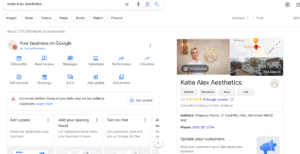
Before you do anything, check your account dashboard or look for an official notification email from Google to find out which type of suspension has been applied.
Soft suspension: Your profile still appears online and in your dashboard, but it isn’t verified and you cannot update the listing. However, users can edit it, making it susceptible to incorrect information.
Hard suspension: Your profile is completely removed from Google Search and Google Maps. Potential customers cannot view your details, reviews, or contact information through your listing.
A hard suspension is more serious than a soft suspension, but can be appealed in the exact same way as a soft suspension.
How to fix your suspended Google Business Profile in 4 simple steps
Appealing a suspension is usually fairly straightforward. However, you must follow these steps in exact order. That’s because submitting an appeal before resolving policy issues will lead to your request being rejected.
Here’s what you need to do:
1. Locate and correct the issue
First, you need to find out what the issue is that caused the suspension.
There are a number of reasons why your GBP could’ve been suspended, such as:
- Keyword stuffing
- Adding a PO Box over the actual business address
- Another business has the same address
- Too many edits to your profile in one go
- Your profile’s URL redirects to a social media page or another website
- Your business hours are listed as 24/7
- Your address or hours don’t match what is on your website
- The account manager has been suspended (so your listing is also suspended)
- Multiple listings for the same business at the same address
- You change your listing from a storefront to a service as a business (SAB) – or the other way round
- Violated the terms of Google’s services
Your profile could be suspended for multiple reasons. It’s a good idea to keep a record of any updates made so that if this occurs, you can look back and understand why.
Once you understand the cause, you should go into your profile (if possible) and make the necessary changes.
Important! Never create a new Google Business Profile to bypass a suspension. This violated Google’s terms and will make reinstatement even more difficult.
2. Gather official verification evidence
Google requires concrete evidence to prove that your business is legitimate. You’ll need to gather digital copies of the following documents before starting the online appeals process:
- Official business registration certificate or business license
- Recent utility bill showing the exact business name and physical address
- Tax certificates or official government correspondence
- Lease agreements, deed documents, or photos of permanently fixed outdoor signage (for physical storefronts)
3. Turn to the Appeals Tool
Google manages reinstatement requests through a dedicated Appeals Tool.
To initiate the appeals process, you’ll need to:
- Log into the Google Account associated with your suspended profile and navigate to the Google Business Profile Appeals Tool.
- Select the specific business profile affected by the suspension.
- Review the policy violation noted by Google (if shown) and select ‘Appeal’.
- Confirm your details and proceed to the evidence submission screen.
Important! Once you click to submit your evidence, you only have 60 minutes to upload all supporting documents. This is why you need to have your evidence saved to your device and ready to upload ahead of time.
4. Monitor case status and respond to Google Support
After submitting your appeal and documentation, you will receive an automated confirmation email containing a unique Case ID number.
- Make a note of your Case ID number, as you’ll need it for all future communications.
- Reinstatement decisions usually take between 3 to 7 business days.
- If Google requests further clarification via email, reply directly to that thread without opening new support tickets. Multiple submissions can slow down review times.
‘The most common mistakes for appeal all stem from a lack of patience. There is no use in rushing to appeal before addressing the issues and ensuring everything is in order. Then once it is appealed, don’t touch it – don’t make changes, try and create duplicates or spam multiple appeals/tickets.’ – Matt Williamson, SEO Lead
What should you do if your reinstatement request gets denied?
If your initial appeal is denied, you should be able to request a secondary review through the Appeals Tool.
To improve your chances on a second attempt:
- Re-examine your documents for small details (e.g., minor address formatting differences between a document and your GBP entry).
- Prepare additional supporting proof that you didn’t submit the first time (e.g., fixed external signage, branded commercial vehicles, lease agreements).
- Submit a concise statement detailing the exact changes you made to bring your profile into full compliance with Google’s guidelines.
How does a suspension differ from a Google ban?
We understand that getting suspended from your Google Business account may seem like the end of the world, but there’s worse… trust us!
Suspension is where the profile is temporarily removed from the listing whereas a Google ban is a complete removal and cannot be accessed at all. The latter is typically due to consistent violations of Google’s terms of service.
Once you get your GBP back after a suspension, it’s best to adhere to the terms of service where possible to prevent future suspensions and potential bans.
5 ways to prevent a suspension in the future
A GBP suspension can have a big impact on visibility and leads. Here’s how you can stop it from happening again in the future:
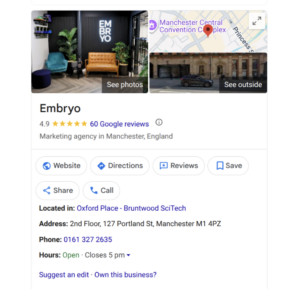
- Keep listing details accurate and consistent: Ensure any physical move, phone number update, or change in opening hours is reflected simultaneously on your website and Google Business Profile.
- Monitor user-generated content (UGC): Frequently check your profile for suggested edits or incorrect user contributions. These can alter your public information without immediate notice.
- Use authentic images: Upload original, high-quality photographs of your building, workspace, team, and projects. Avoid stock photos, as automated filters may flag them as deceptive.
- Follow Google’s guidelines for service area businesses: If you visit or deliver to customers but do not have a physical office they can visit, hide your address on your listing and define your explicit service areas instead.
- Secure your account: Limit owner and manager permissions to trusted personnel, enable two-factor authentication (2FA), and remove access for inactive users.
- Manage reviews ethically: Maintaining an authentic reputation is essential. For guidance on handling customer feedback, check out our guide on how to handle negative reviews.
Need expert help reinstating your listing?
Navigating Google’s compliance requirements and appeal deadlines can be tricky. Submitting an incomplete appeal can make the process even longer, leading to lost customer calls and revenue.
If your appeal has been delayed, rejected, or you just need some professional guidance on managing your local search footprint, our experienced SEO team can help.
Contact us to find out more about our dedicated local SEO services.
Deeper insights