
ChatGPT Business Hub is OpenAI’s new portal for claiming and managing how your business appears inside ChatGPT. It’s essentially the equivalent of Google’s Search Console and Google Business Profile combined. It launched in beta on 10 November 2026, and any eligible business in a country where ChatGPT is available can apply.
Once your business is verified, you’ll be able to:
- Correct all of your business details
- Add product feeds with pricing and availability
- See how often ChatGPT mentions you, how many people click through to your website, and the topics you appear in
This is the first first-party data OpenAI has shared on how brands show up in its unpaid answers, which marketers have been crying out for, and it’s why we’re recommending every client claim their profile now.
The setup takes five steps. Here’s how to do it.
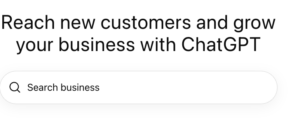
Step 1: Search for your business
Go to chatgpt.com/business-hub and type your business name into the search bar.
If ChatGPT already holds a listing for you, select it to claim it. If nothing comes up you can create a new listing instead.
Step 2: Choose how customers reach you
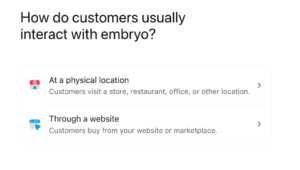
ChatGPT will then ask how customers usually interact with your business. There are two options: At a physical location or through a website.
At the time of writing, the physical location route doesn’t appear to be accepting claims yet, so start with your website even if you also have shops or offices.
Once you click through a website, you’ll then be asked to input the URL.
Step 3: Verify your domain
To prove you control your website, ChatGPT gives you a TXT record to add to your domain’s DNS settings. You add it through your domain provider, for example, GoDaddy, Cloudflare or 123 Reg.
The record has three parts:
| Field | What to enter |
| Type | TXT |
| Name or host | openai-business-profile.yourdomain.com |
| Value or content | openai-business-profile= followed by your unique code |
If you’re unsure where to add this, speak to your hosting provider or get in touch with the team at Embryo for support.
Step 4: Tell ChatGPT about your business
You’ll then be asked to “Help people get to know…” your business. Choose your Business category from the dropdown. Pick the closest match to what customers actually buy from you.
In the “more about your business” section, add a brief summary of what your business offers.
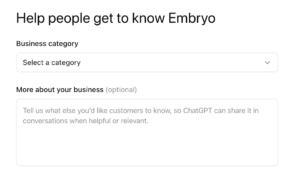
Treat it as a factual brief rather than marketing copy. Useful details include:
- what you sell and who it’s for
- your price range or positioning
- where you deliver to or operate
- what genuinely sets you apart, such as a free delivery threshold or a product guarantee
Step 5: Add contact, returns and delivery details
The final steps will ask you to add your customer service phone number and email, then your returns and delivery information. There’s no option to distinguish service-based businesses yet, so if this is you, just mark delivery and returns as not offered.
If they do apply, try to match your website exactly & if you change a policy, such as extended returns over Christmas, update your profile at the same time.
Need a hand?
If you’d like support claiming your profile, or want to read your Business Hub data alongside your SEO and GA4 reporting, speak to your Embryo account team. We’ll work through it with you and fold the insights into your organic strategy.